
In GTA 6, Heat icons show what police know about a suspect. There are six types: security camera, couple, clothing, appearance, weapon, and vehicle. Active icons help you decide what to change, hide, or remove.
Key Points
- The icons show what police know about you, not whether your behavior is good or bad.
- Match your response to each active clue: change clothes, leave a known vehicle, or destroy a recording.
- Even after your wanted stars disappear, remaining clues can allow police to identify you again.
Heat Icon Types
Red circular icons appear below the wanted stars in the upper-right corner. Several can be active at once. Select an icon to jump to its meaning, activation conditions, and clearing methods.
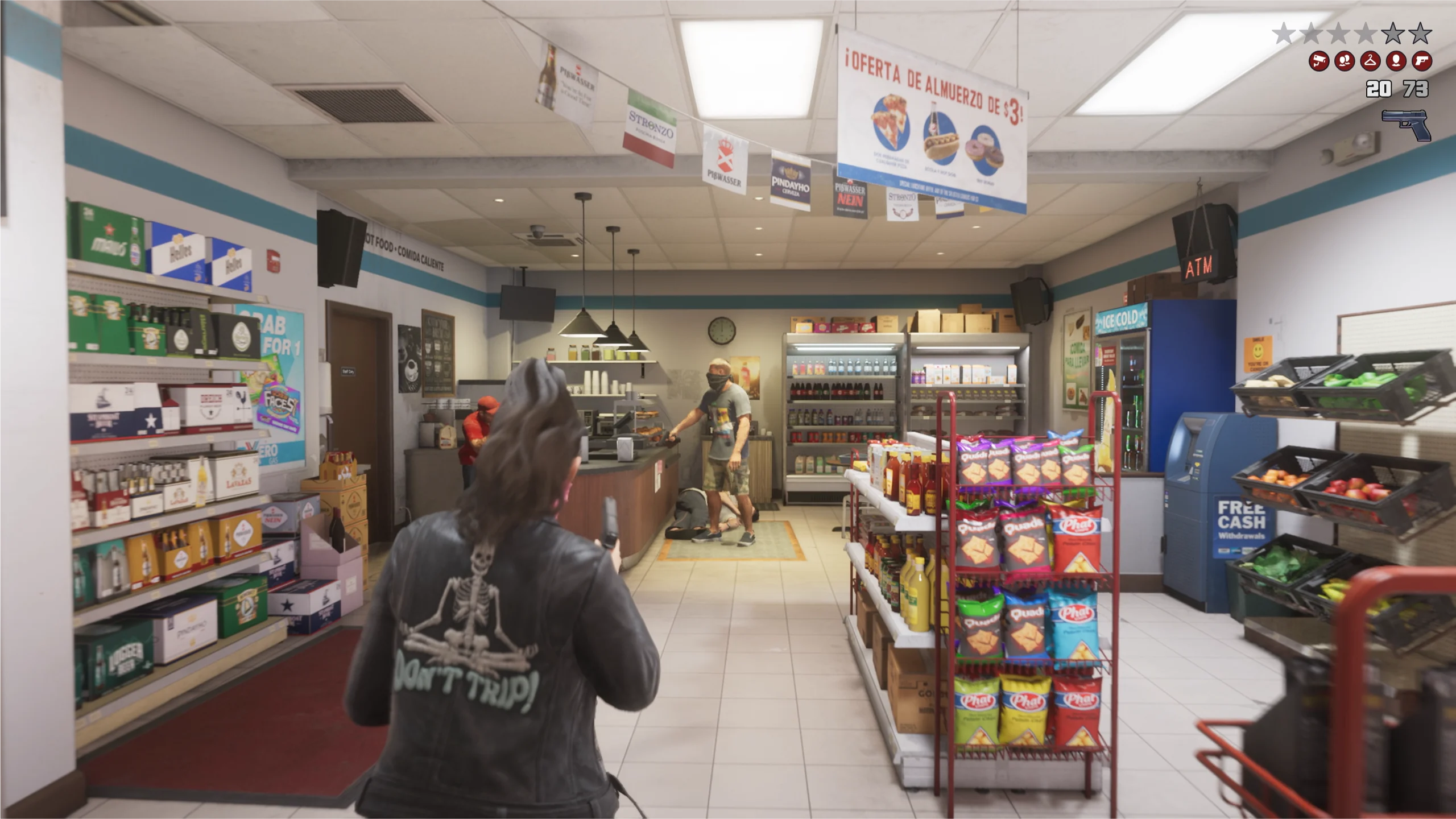
Activating and Clearing Icons
To clear them, address each active icon individually. Switching cars still leaves another clue if police know what you are wearing.

Security Camera
Security footage has recorded you during the crime, giving police information they can use in their investigation.
- When It Activates
- A security camera records you during the crime, and the footage becomes evidence for the investigation.
- How to Clear It
- Destroy the storage device holding the recording, or erase the footage.
Avoid the camera, or destroy it before it records you.
Note: Destroying the camera after you have been recorded does not remove the evidence if the recording still exists. Destroy the storage device or erase the footage.

Couple
Police know that Jason and Lucia are operating together as a pair.
- When It Activates
- Witnesses or police learn that the two of you are committing a crime or escaping together.
- How to Clear It
- Have Jason and Lucia split up so police can no longer rely on seeing the pair together.
If police know you are a pair, taking separate escape routes is an option.
Note: Splitting up can reportedly reduce your wanted level by one star in some situations. However, if either character is arrested, you get Busted even if the other escapes.

Clothing
Police know what the suspect was wearing and are looking for someone in those clothes.
- When It Activates
- Your clothes are seen during the crime or getaway, and that information reaches police.
- How to Clear It
- Change into a different outfit so you no longer match the clothing description police have.
You can change at a clothing store or use spare outfits stored in your personal vehicle.
Note: Changing only accessories, such as a hat or glasses, may not be enough to invalidate the clothing description.

Appearance
Police have a description of your face, hairstyle, or other physical features. This is tracked separately from clothing.
- When It Activates
- Witnesses, police, or others obtain a description of the suspect’s face or appearance.
- How to Clear It
- Change your hairstyle or other features that police have identified.
Wearing a mask before the crime makes your appearance harder to identify (making the Appearance icon less likely to activate). This is a preventive measure, distinct from clearing an icon after you have been identified.
Note: Changing your appearance does not clear information about your clothing or vehicle. Check which other icons remain active.

Weapon
Police know which weapon was used in the crime, making it another clue they can use to identify the suspect.
- When It Activates
- The weapon you carried or used during the crime is seen, and police obtain that information.
- How to Clear It
- Stash the weapon police have identified, or drop it so you are no longer carrying it.
Carrying a long gun openly also affects how people and police react to you.
Note: After stashing the weapon, you may still be recognized if icons for other clues, such as clothing or appearance, remain active.
Vehicle
Police have identified the vehicle the suspect is using and can search for it.
- When It Activates
- The vehicle used in the crime or getaway is seen, and police learn its details.
- How to Clear It
- Get out of the vehicle police have identified, or repaint it to change how it looks from when it was used in the crime.
The Vehicle icon clears when you get out of the vehicle police have identified. You do not necessarily need to switch to another vehicle.
Note: Even if the Vehicle icon clears, check whether clues such as clothing or appearance remain active. Returning to the original vehicle police know about also risks being spotted again.
We will update finer details, such as the time or distance needed to clear icons and how much your appearance must change, as these conditions are verified.
After Wanted Stars Disappear
If your wanted stars disappear but Heat icons remain, police still remember details such as your clothing, appearance, or vehicle. If those clues lead police to identify you again, you may become wanted again.
- Check which icons remain active
Look for multiple clues, including clothing and appearance, rather than checking only your vehicle.
- Address the known details
Choose actions that match the active clues, such as switching vehicles, changing clothes, or altering your appearance.
- Watch the police search area
A heat zone can remain around the crime scene, where police may continue searching after the immediate pursuit ends. Avoid returning right away.
Clearing one icon does not mean every clue has been removed. Keep checking which information remains as you move.
Heat vs Wanted Level
| Display | What It Tells You |
|---|---|
| Number of wanted stars | Your wanted level, indicating the intensity of the police response. |
| Star appearance | The police state, such as suspect identification, pursuit, or search. |
| Heat icons | Information police have, such as clothing, appearance, and vehicle details. |
| Heat zone | An area police search around the crime scene. This is separate from the icons themselves. |
An active Heat icon does not necessarily mean police have located you. Check what they know separately from the current pursuit state.
For star types, levels one through six, heat zones, and escape tactics, see GTA 6 Police & Wanted Level Explained.
The face icons assessing your behavior belong to a different system: see Criminal Profile states and actions. For other features, visit Game Systems & Basic Features.